
Syncing Chats
HAEVN offers two ways to sync conversations: single chat sync (one conversation at a time) and bulk sync (your entire history from a platform).
Single chat sync
Section titled “Single chat sync”Single chat sync is the fastest way to save a conversation you’re currently viewing.
-
Navigate to a conversation on any supported platform.
-
Click the HAEVN icon in your Chrome toolbar.
-
The popup shows the conversation title and its sync status.
-
Click SYNC. HAEVN captures the full conversation and saves it locally.
The sync typically completes in under two seconds. Once done, the status changes to SYNCED and the conversation appears in your archive.
Bulk sync
Section titled “Bulk sync”Bulk sync downloads your entire conversation history from a platform in one operation. This is the best way to get started — import everything at once and then use single chat sync going forward.
Starting a bulk sync
Section titled “Starting a bulk sync”Click the HAEVN icon on any supported platform. Click the Sync All button (below the main Sync button). HAEVN will open the Providers view and begin syncing in the background.
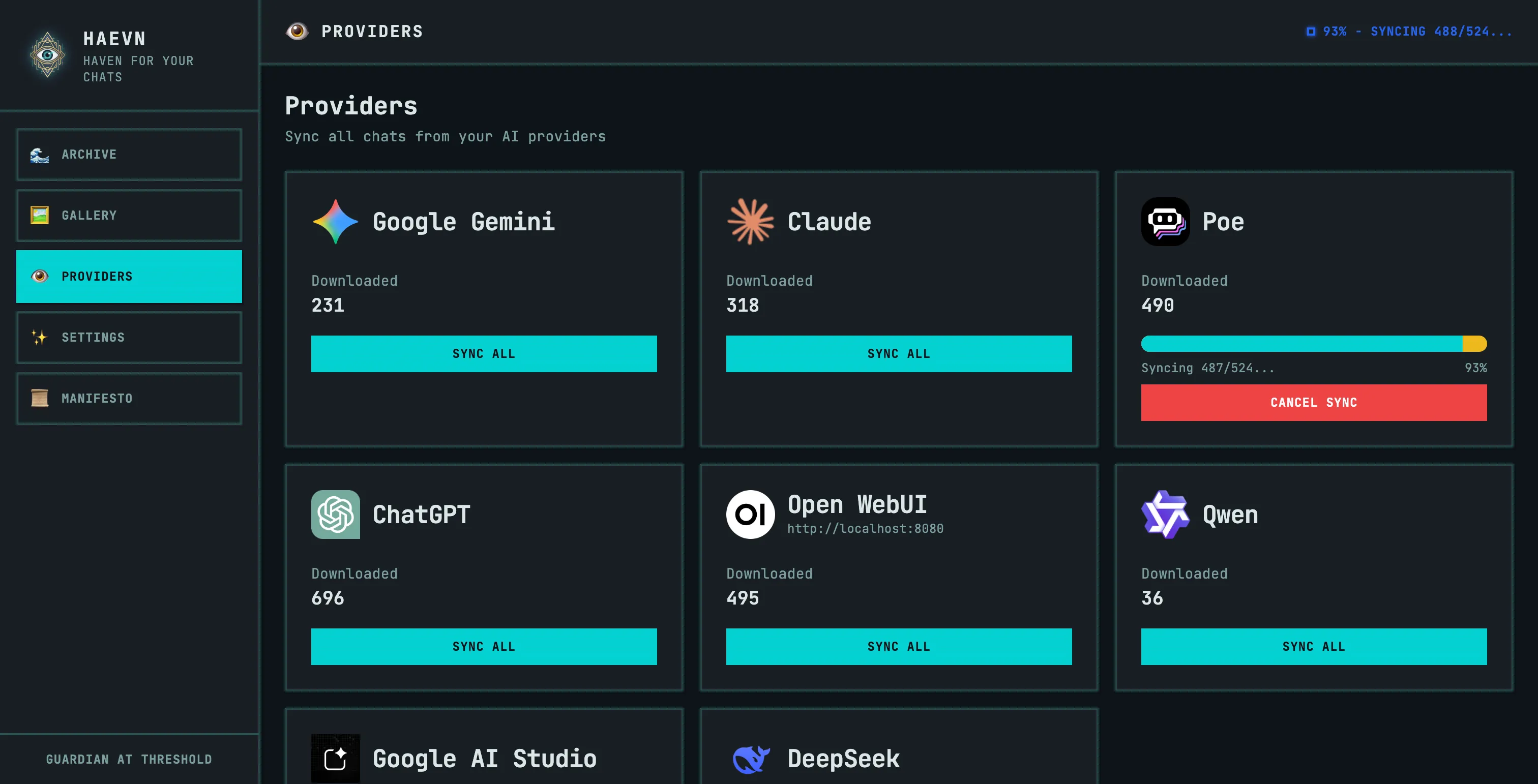
Open the archive (click Archive in the popup, or right-click the HAEVN icon → Options). Navigate to Providers in the left sidebar. Find the platform you want to sync and click SYNC ALL.
Monitoring progress
Section titled “Monitoring progress”The Providers view shows real-time progress for any active sync:
- A progress bar shows completion percentage
- The counter shows
Syncing X/Y...(current / total) - The Downloaded count updates as conversations are saved
You can navigate away from the Providers view — the sync runs in the background.
Pausing and cancelling
Section titled “Pausing and cancelling”Click CANCEL SYNC on the platform card to stop a bulk sync. If you close the browser while a sync is running, HAEVN will automatically resume it the next time you open Chrome.
What gets synced
Section titled “What gets synced”HAEVN captures the complete conversation, not just the text:
| Content | Synced? |
|---|---|
| All messages (user and assistant) | ✅ |
| Images (uploaded and AI-generated) | ✅ |
| File attachments (PDFs, documents) | ✅ |
| Code blocks | ✅ |
| Thinking blocks (Claude extended thinking) | ✅ |
| Tool calls and results (web search, code interpreter, etc.) | ✅ |
| Conversation branches (when you regenerate a response) | ✅ |
| Timestamps for each message | ✅ |
Sync methods
Section titled “Sync methods”Different platforms use different sync methods, which affects speed and behavior:
| Method | Platforms | Speed | Notes |
|---|---|---|---|
| API | ChatGPT, Claude, Open WebUI | Fast | Runs silently in the background |
| Navigation | Poe, Gemini | Slower | HAEVN navigates through your chat list |
API-based sync is preferred where available. Navigation-based sync requires the platform to be open in a tab during the operation.